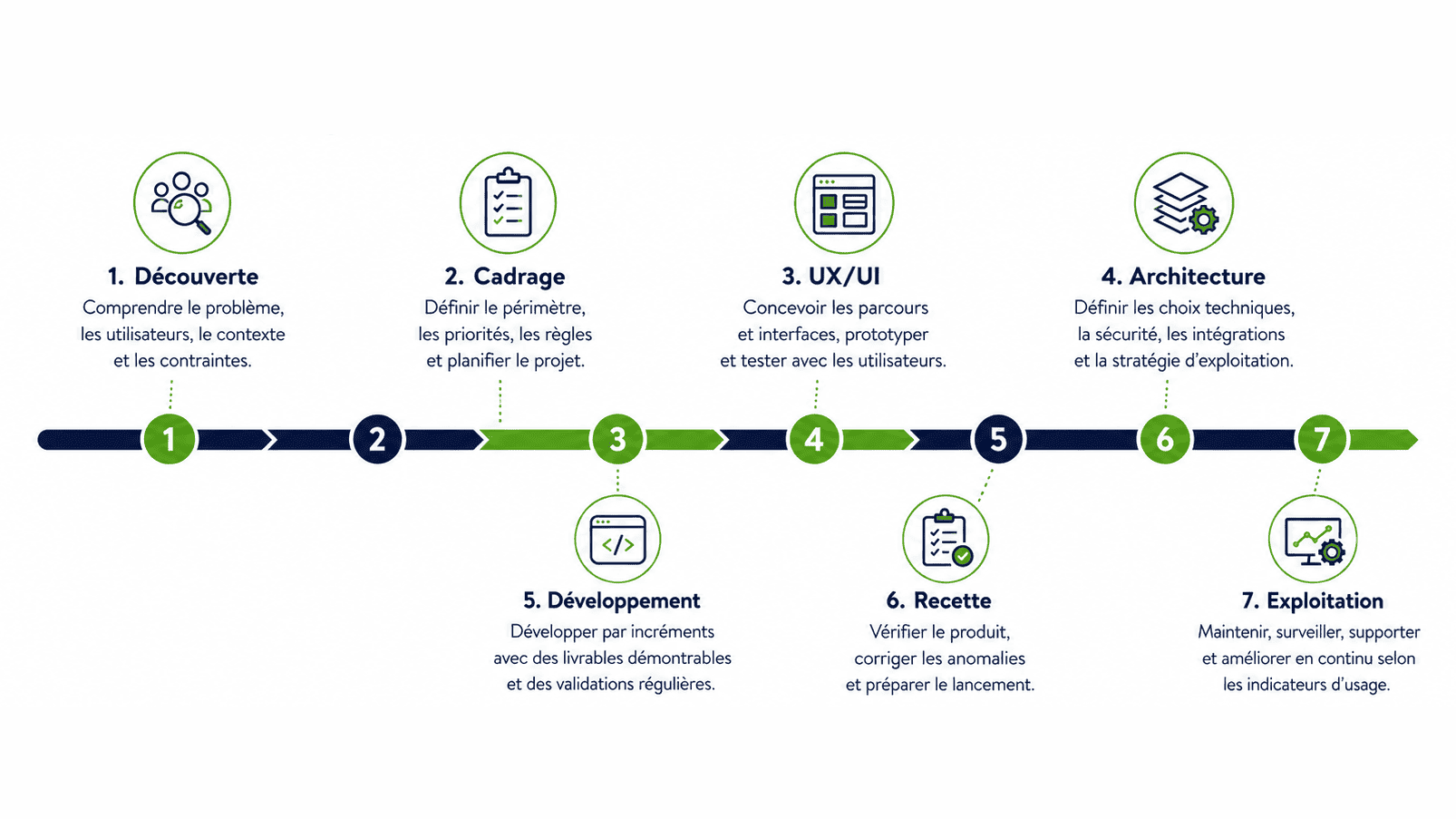
A web development project doesn't start with code, and it doesn't end the day it goes live. Somewhere in between, you have to turn a business need into real user journeys, define an architecture, build the thing piece by piece, validate what you've built, and set up how it'll actually be run afterward.
The exact path varies depending on the product, but the seven steps below give you a solid framework — whether you're building a complex website, a business application, a SaaS product, or a client portal.
The Project at a Glance
| Step | Goal | Main Deliverable | Validation |
|---|---|---|---|
| 1. Discovery | Understand the problem and the users | A summary of goals and constraints | Agreement on the actual need |
| 2. Scoping | Define the scope and priorities | Backlog, business rules, and project plan | Initial scope signed off |
| 3. UX/UI | Design the journeys and screens | Wireframes and a prototype | Testable journeys validated |
| 4. Architecture | Lock in the structural decisions | Architecture and operations strategy | Technical review |
| 5. Development | Build in increments | Demonstrable versions | Sign-off at each cycle |
| 6. QA & Launch Prep | Validate the product and prepare for launch | Test report and go-live decision | Go/no-go |
| 7. Operations | Maintain and keep improving | Monitoring, support, and roadmap | Regular review of metrics |
Step 1: Understand the Problem
The first phase brings together the people who can actually explain the business, the users, how things work today, and what constraints are non-negotiable. The goal here isn't to list out every screen yet — it's to get the fundamentals straight.
The questions that matter most:
- what problem actually needs solving;
- who's running into it;
- how it's being handled today, before this project exists;
- which data and systems are involved;
- what outcome would make this whole project worth it;
- what constraints exist around timeline, budget, security, or compliance.
Who's involved: the sponsor, the business lead, a few representative users, and the project team.
Deliverable: a summary of goals, users, constraints, and success metrics.
Sign-off point: agreement on the problem to solve and the results you're aiming for.
Step 2: Scope the Product
Scoping is where the vision turns into something you can actually build. Features get organized by user journey and priority, and any dependencies, assumptions, and risks get put on the table where everyone can see them.
For a product that's expected to evolve over time, it's usually smarter to define a useful first version rather than trying to ship everything at once. Scoping also sets the ground rules for how new requests will be handled once the project's underway.
Who's involved: the product owner, the project lead, business experts, and technical leads.
Deliverables: an initial backlog, business rules, scope, exclusions, an estimate, and milestones.
Sign-off point: scope, budget, and responsibilities are formally agreed on.
Step 3: Design the UX/UI
UX/UI gives your requirements a shape you can actually test, before you sink real money into full development.
This work can include:
- sitemap and user journeys;
- wireframes;
- an interactive prototype;
- a design system and reusable components;
- mobile adaptation;
- accessibility;
- testing with real users.
A prototype isn't just about how things look. It's there to confirm that users actually understand what to do, can find what they need, and can make it through their journey without getting stuck.
Who's involved: the UX/UI designer, the product owner, real users, and the technical team.
Deliverables: user journeys, wireframes, a prototype, and interface guidelines.
Sign-off point: the priority scenarios are understood and usable.
Step 4: Define the Architecture
Architecture covers the technology stack, data, integrations, environments, security, and deployment strategy. It needs to serve today's scope without boxing you into a corner when future changes come along.
The structural decisions here typically cover:
- frontend, backend, and database choices;
- user roles and access control;
- APIs and external systems;
- hosting and where data actually lives;
- backups and disaster recovery;
- testing and the CI/CD pipeline;
- logging, alerts, and monitoring.
Who's involved: the architect or tech lead, DevOps, security, and whoever owns any connected systems.
Deliverable: an architecture diagram with the decisions documented.
Sign-off point: critical risks are either resolved or covered by a technical proof of concept.
Step 5: Build in Increments
Development runs in cycles, each one producing something you can actually see and test. How long each cycle lasts depends on the team and the project — two weeks is common, but it's a rhythm, not a rule.
Each cycle typically includes:
- picking what's ready to build;
- development and code review;
- testing;
- deploying to a staging environment;
- a demo;
- feedback and adjusting priorities for next time.
The client should always be able to see what's working, what's still left to do, and what's putting the timeline at risk. Real transparency is worth a lot more than some abstract "70% complete" number.
Who's involved: developers, a designer, a tester, the product owner, and the project manager.
Deliverables: testable versions, documentation, and updated decisions.
Sign-off point: acceptance criteria are met for each piece of work.
Step 6: Test and Prepare for Launch
Final QA shouldn't be the first time the client actually uses the product. It's there to confirm every journey works as expected and get operations ready for launch.
Depending on how much risk is involved, checks can include:
- functional and regression testing;
- device and browser compatibility;
- accessibility;
- performance under defined scenarios;
- security;
- data migration and data quality;
- backup and restore testing;
- deployment and rollback procedures;
- training and support readiness.
Who's involved: QA, key users, technical and operations teams, and the business lead.
Deliverables: a QA report, categorized issues, a launch procedure, and a support plan.
Sign-off point: a formal go-live decision — or a documented, well-reasoned delay.
Step 7: Run and Keep Improving It
Once the product is live, the team starts watching how it's actually being used. Technical and business metrics together help you tell the difference between a performance issue, a UX misunderstanding, and a feature that just isn't pulling its weight.
Ongoing operations cover:
- monitoring and alerts;
- incident response;
- verified backups;
- security updates;
- corrective maintenance;
- analyzing user feedback;
- prioritizing what gets built next.
Who's involved: support, operations, the product owner, developers, and business stakeholders.
Deliverables: tracking reports, an improvement backlog, and a maintenance calendar.
Sign-off point: a regular review of service quality and the value actually being delivered.
What the Client Is Responsible For
Success here isn't just on the agency. The company needs to appoint a real decision-maker, keep business experts available when needed, provide content and access on time, and sign off within the agreed timelines.
When several people could potentially block a decision, get clear early on who gets consulted, who makes recommendations, and who actually has the final say.
MONARK IT supports every one of these steps, from scoping and UX/UI through web development, deployment, and ongoing maintenance. To go deeper on how we industrialize this process, check out our guide on DevOps and CI/CD.