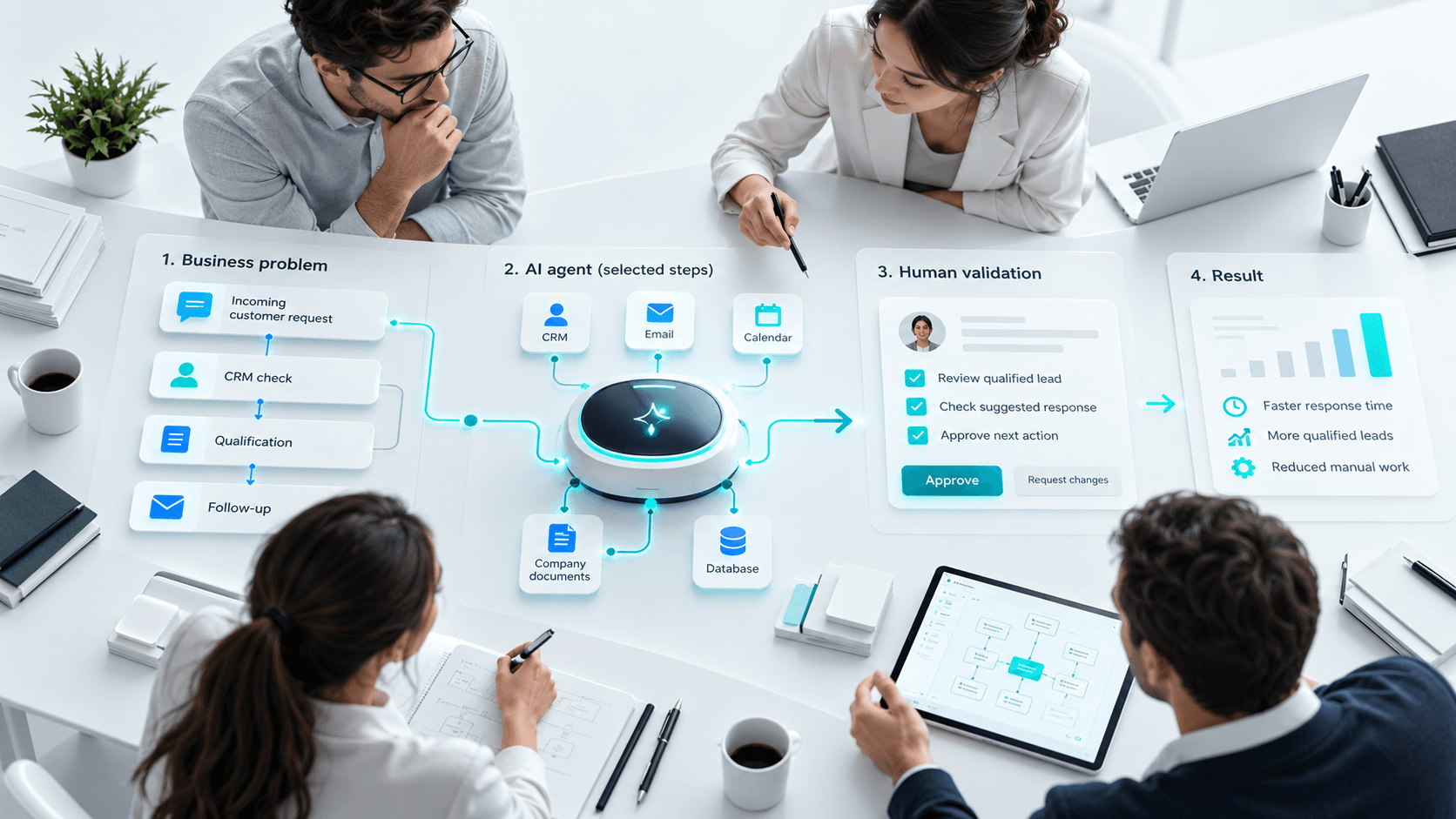
Building an AI agent that can use a CRM, search documents or perform business tasks is only the first step.
Once the agent starts acting inside a real business process, another question becomes important:
Who checks what the agent is doing?
An agent can misunderstand a request, use the wrong information or continue when it should stop.
Supervision helps teams monitor its activity, control important actions and decide when a human needs to step in.
This guide explains how AI agent supervision works, how several agents can be coordinated and how businesses can stay in control as agents become more autonomous.
What is an AI agent supervisor?
An AI agent supervisor can be a person or a software system.
Its role is to monitor or coordinate the work performed by one or more agents.
The basic logic is:
Observe → Control → Decide → Intervene when needed
Imagine a company using several agents:
- one analyzes a request;
- another checks the CRM;
- another prepares a response;
- another creates a follow-up task.
A supervisor can coordinate these steps and stop the process when information is missing or human approval is required.
Why supervise an AI agent?
The more actions an agent performs, the more impact an error can have.
Consider this workflow:
Analyze lead → Check CRM → Update record → Prepare email → Send email
If the first analysis is wrong, the following actions may also be affected.
Supervision can help detect:
- missing information;
- inconsistent results;
- incorrect tool usage;
- unauthorized actions;
- workflows that keep running unnecessarily.
The goal is not to approve every small action manually.
It is to decide what can be automated and what still requires control.
The supervisor as an orchestrator
A supervisor becomes especially useful when several agents work together.
Consider customer support:
Request → Analysis → Documentation search → Suggested response → Control → Response
One agent can analyze the ticket.
Another can search the knowledge base.
A third can prepare the answer.
The supervisor then decides whether the result is reliable enough or should be transferred to a person.
This makes more complex automation possible without giving all responsibility to one agent.
The three pillars of supervision
A company can start by monitoring three areas.
| Pillar | What to monitor |
|---|---|
| Performance | Is the agent completing its task correctly? |
| Cost | How much does each task or process cost? |
| Control | Does it respect rules and permissions? |
Performance is not only about the number of tasks completed.
The quality of the results matters too.
Cost also matters because one task may involve several AI model or external service calls.
Finally, the agent should remain within its defined role.
Which metrics should you monitor?
You do not need a complex dashboard at the beginning.
A few indicators can be enough:
- tasks processed;
- errors;
- human interventions;
- average processing time;
- cost per task;
- corrections made after the agent.
Useful questions include:
Is the agent actually saving time?
When do users regularly need to correct its work?
Manage errors safely
A good agent should know what to do when it cannot complete a task.
For example:
- the CRM is unavailable;
- required information is missing;
- a result is unclear;
- the agent lacks permission;
- an API returns an error.
Depending on the situation, it may:
Retry → Ask for approval → Transfer to a human → Stop
Continuing as if nothing happened is often the riskiest option.
Knowing when to stop is part of good supervision.
Supervising more autonomous agents
Autonomy can increase gradually.
Level 1 — The agent suggests
It prepares an action and a person approves it.
Level 2 — The agent handles simple tasks
Low-risk actions can be automated.
Level 3 — The agent manages several steps
It can complete a longer workflow once the process has been tested.
Autonomy should depend on business risk, not only on what the technology can do.
Automating more complex business processes
Supervision becomes more useful when several tools or agents are involved.
For lead management:
Request → Analysis → CRM → Qualification → Assignment → Follow-up
Each step can be handled by a different agent or function.
The supervisor helps ensure the steps happen in the right order and that information remains consistent.
The same approach can be used for:
- customer support;
- recruitment;
- document processing;
- project management;
- content workflows;
- administrative tasks.
Not every step needs to be automated.
Some can remain human by design.
When humans become AI agent supervisors
AI agents can also change the role of users.
Instead of performing every task directly, people may spend more time:
- defining objectives;
- providing context;
- reviewing results;
- handling exceptions;
- improving instructions.
This is already visible with coding agents.
A developer can ask an agent to update files or generate tests, but still remains responsible for code quality, architecture and security.
The human role does not disappear.
It shifts toward more guidance and validation.
Skills for supervising AI agents
You do not need to become an AI expert.
Useful skills include:
- defining clear objectives;
- understanding the business process;
- identifying risks;
- spotting inconsistent results;
- knowing when to intervene;
- measuring outcomes.
Business knowledge remains important.
The agent can suggest an action, but a person still needs to judge whether that action makes sense.
Benefits and limitations
| Benefits | Limitations |
|---|---|
| More control | Adds another management layer |
| Better error handling | Requires monitoring |
| Gradual autonomy | Does not remove every error |
| Better traceability | Can increase technical complexity |
Supervision does not make an agent perfect.
It makes its behavior more visible and easier to control.
How to start simply
You do not need a complex multi-agent architecture from day one.
Start with one agent and one clear mission.
- Define what it can do.
- Limit its permissions.
- Identify sensitive actions.
- Add human approval.
- Record important actions.
- Monitor errors and results.
- Increase autonomy gradually.
A more advanced supervisor becomes useful when several agents genuinely need to work together.
More autonomy does not always mean full automation
Full automation should not automatically be the goal.
For some processes, a highly autonomous agent may work well.
For others, the best workflow may remain:
Agent prepares → Human decides → Agent executes
The right solution is the one that improves the process while keeping risk under control.
Conclusion
Supervising an AI agent for business means keeping visibility over what it does, which tools it uses and which actions it performs.
When several agents are involved, a supervisor can also coordinate their work.
The logic remains simple:
Observe → Control → Measure → Improve
As agents become more autonomous, businesses need to know when to let them act and when a human should take control.
FAQ
What is an AI agent supervisor?
It is a person or system that monitors, controls or coordinates the actions of one or more AI agents.
What is the difference between an agent and a supervisor?
The agent performs a task. The supervisor monitors or organizes the work performed by agents.
Does every AI agent need a supervisor?
No. A simple agent with limited autonomy may only require monitoring and a few approval steps.
Can one supervisor manage several agents?
Yes. It can distribute tasks and coordinate different stages of a workflow.
Which metrics should you monitor?
Errors, human interventions, processing time, cost and output quality are useful starting points.
How should an AI agent error be handled?
The agent can retry, request approval, transfer the case to a person or stop the workflow.
Can AI agents fully automate a business process?
Some well-defined processes can be highly automated, but full automation is not always necessary or desirable.
What is the human role?
Humans define goals, review results, handle exceptions and decide what can safely be automated.