Once you understand what an AI agent is, the next question is usually: where should you start?
A common mistake is to start with the technology.
“We want a sales AI agent.”
A better question is:
“Which task do we want to improve?”
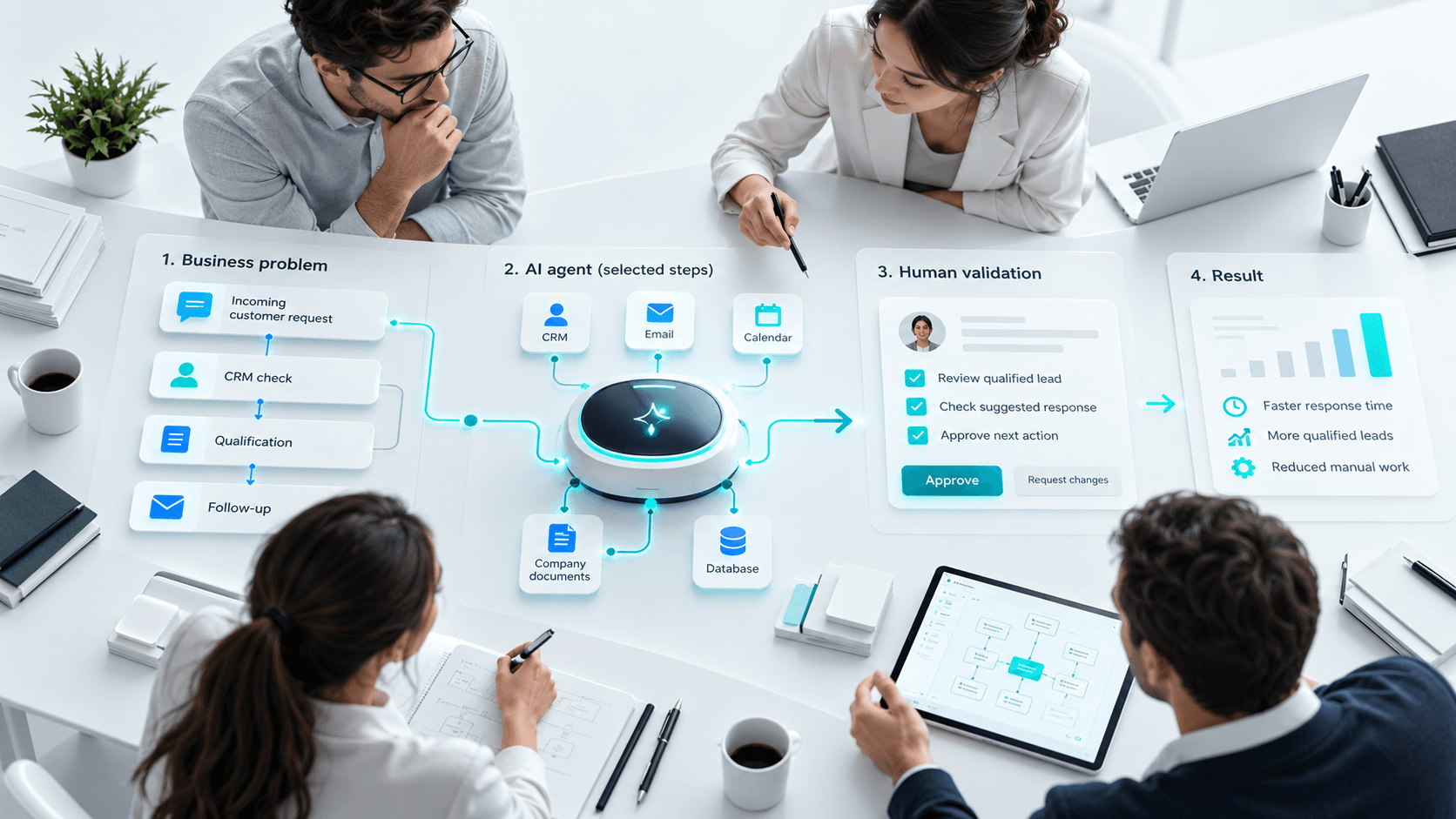
To create an AI agent that is genuinely useful, start with a real business problem, understand the current process and decide what the agent should improve.
This guide explains how to choose your first use case, define the agent’s mission, identify the data and tools it needs, and test its value gradually.
Start with the problem, not the agent
An AI agent is not the goal.
The real goal may be to:
- save time;
- reduce repetitive work;
- process more requests;
- improve follow-up;
- access information faster.
Consider a sales team.
Today, someone may need to:
- read a request;
- understand the need;
- check the CRM;
- qualify the prospect;
- assign it to the right salesperson.
The real need is not:
“Build a sales agent.”
It is:
“Reduce the time spent qualifying new sales requests.”
This makes it easier to decide whether an AI agent is actually the right solution.
How to choose a good first use case
A first project should be easy to understand and measure.
| Criterion | Why it matters |
|---|---|
| Frequent | Time savings become visible quickly. |
| Repetitive | Part of the task can be standardized. |
| Well understood | The team already knows the process. |
| Measurable | Results can be compared before and after. |
| Limited risk | Mistakes can be corrected easily. |
| Available data | The agent has the information it needs. |
Lead qualification, ticket analysis, response preparation and document summarization are often good starting points.
Do you really need an AI agent?
Not always.
Traditional automation may be enough.
Traditional automation
Form submitted → create a CRM contact.
The rule is fixed.
AI agent
Read the request → understand the intent → check the CRM → suggest a qualification → prepare the next action.
Here, the system needs to interpret the situation.
| Need | Suitable solution |
|---|---|
| Fixed and predictable action | Automation |
| Simple question answering | Chatbot or assistant |
| Understand, choose and use several tools | AI agent |
| Execute a specific business process | Custom AI agent |
An agent is useful when the system needs to understand before acting.
Describe the current process
Before building the agent, map how the work is done today.
For example:
Request → Review → Qualification → CRM → Assignment → Follow-up
For each step, ask:
- Who performs it?
- What information is used?
- Which tool is required?
- What decision is made?
- Where is time being lost?
You may discover that only one or two steps need improvement.
Give the agent one clear mission
Avoid broad missions.
Instead of:
“Manage prospects.”
Use:
“Analyze new sales requests, identify the need, check available information and prepare a qualification.”
A clear mission defines:
- what the agent receives;
- what it needs to understand;
- what it can access;
- what it should produce.
Define the data and tools it needs
Ask:
What information does a person currently use to perform this task?
For a sales agent, this may include:
- form content;
- prospect details;
- service information;
- CRM history;
- qualification rules.
The agent may then connect to:
- CRM;
- email;
- calendar;
- document systems;
- ERP;
- business applications;
- APIs.
For a first prototype, one or two integrations are often enough.
Define what the agent can do
There are three simple levels.
Read
Access information.
Prepare
Suggest an action or response.
Act
Change data, create a task or send a message.
A good first setup is often:
Read → Prepare → Human approval
More actions can be automated later.
Build a limited prototype
The first agent does not need to manage the entire process.
For example:
Version 1: analyze the request.
Version 2: also check the CRM.
Version 3: prepare the qualification.
Version 4: create selected tasks automatically.
This makes it easier to test value before adding complexity.
Test with real cases
Do not test only perfect examples.
Include:
- missing information;
- ambiguous requests;
- poorly written messages;
- existing prospects;
- unusual situations.
Observe:
- when the agent works;
- when it hesitates;
- when it fails;
- when a person needs to intervene.
Use these results to improve the instructions and rules.
Measure real value
A useful agent should improve a real process.
Track things such as:
- time saved;
- volume processed;
- errors;
- human corrections;
- team adoption.
The main question is:
Does the agent genuinely make the work easier?
If people spend more time correcting it than doing the task manually, the use case needs to be reconsidered.
Good first AI agent use cases
| Area | Possible use case |
|---|---|
| Sales | Qualify incoming leads |
| Support | Analyze a ticket and prepare a response |
| HR | Prepare information before human review |
| Projects | Summarize tasks, risks and blockers |
| Content | Prepare research, outline and draft |
| Documentation | Search and summarize internal information |
A simple method to create your first AI agent
- Choose one specific task.
- Describe the current process.
- Identify where time is lost.
- Define the required data.
- Choose the tools to connect.
- Define allowed actions.
- Add human approval where needed.
- Build a limited prototype.
- Test with real cases.
- Measure before expanding.
The goal is not to create a highly autonomous agent immediately.
The goal is to prove that it can improve a real business process.
Conclusion
To create an AI agent, start with the problem, not the technology.
A good first use case is usually frequent, measurable, well understood and relatively low risk.
Then define the data, tools, actions and human approval required.
The process is simple:
Problem → Prototype → Testing → Measurement → Improvement
In the next guide, we will look at how to supervise an AI agent, coordinate multiple agents and stay in control as they become more autonomous.
FAQ
1. Which AI agent should a company build first?
Start with a frequent, repetitive, measurable and low-risk task.
2. How do you choose a good use case?
Choose a task where someone currently needs to understand information before deciding what to do.
3. What is the difference between an AI agent and automation?
Automation follows fixed rules. An AI agent can interpret context before acting.
4. Do you need to know how to code?
Not always for a simple prototype. Advanced integrations usually require technical expertise.
5. What data does an AI agent need?
Mostly the same information a person currently uses to perform the task.
6. Can an AI agent connect to a CRM or ERP?
Yes, if those systems provide APIs or other integration methods.
7. How long does it take to build a first agent?
A simple prototype may sometimes be built in a few days. Production deployment usually requires more development and testing.
8. How do you know if the agent is useful?
Measure time saved, errors, human corrections and actual team usage.