
What is Symfony?
Symfony is an open-source PHP framework used to build web applications. It gives developers a modular structure, a library of reusable components, and follows the MVC (Model-View-Controller) pattern to keep code organized. Out of the box, it handles routing, HTTP requests and responses, forms, security, data validation, and a lot more.
Symfony's Release Cycle
Symfony follows a pretty predictable release schedule: minor versions come out every six months, and a new major version lands every two years. Minor releases bring bug fixes and new features but never break your existing code, so upgrading between them is usually painless.
The exact calendar shifts slightly from year to year, but here's the general pattern Symfony follows:
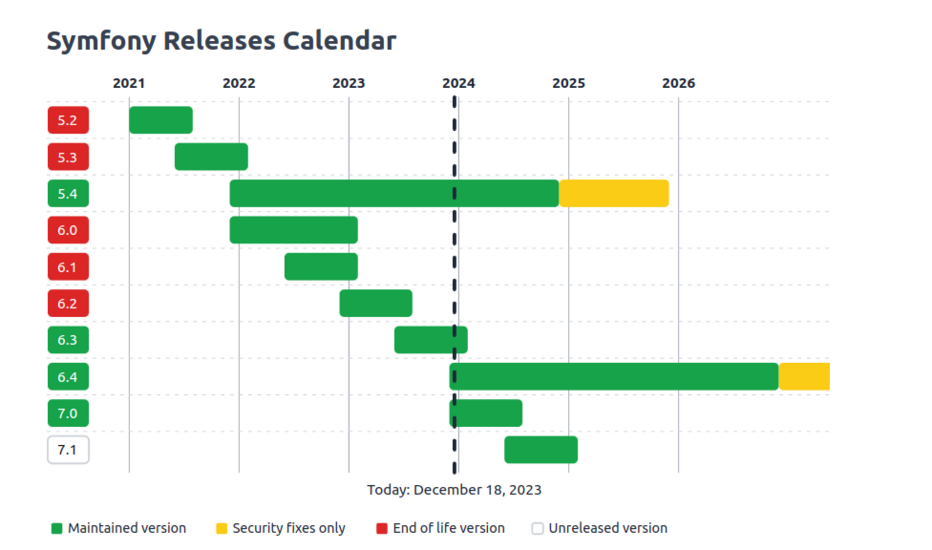
Major versions tend to bring bigger changes — new features, real architectural improvements — and sometimes require you to rework parts of your codebase. The jump from Symfony 4 to Symfony 5, for instance, was a major upgrade in every sense.
Minor versions are lighter: new features, fixes, and polish, without touching the underlying architecture.
Why Bother Upgrading?
A web project isn't a one-and-done deliverable — it's alive. That sounds obvious when you say it out loud, but in practice we see plenty of projects that get shipped and then never touched again. Years later, making even a small change becomes a slow, expensive ordeal because so much has been left to drift. Going live is really just one milestone in a much longer story; what comes next is maintenance, and it works best when it's proactive rather than reactive — catching things like:
- Risks: bugs, end-of-life dependencies, security holes
- Opportunities: new features, better performance
Staying on top of this lets you dodge the obvious risks, plan future development with fewer surprises, schedule upgrades during quieter periods, and keep the project current without blowing the budget.
"I've Got a Project That Needs Maintaining"
We still run into projects that haven't been updated in over a decade. Sooner or later, a new business requirement or a performance bottleneck forces a long, painful development cycle — one that would have been so much simpler if the project had been kept up to date all along.
What Actually Happens During a Migration?
Most of the real work happens in your composer.json file. Every Symfony library listed there — anything in the "symfony/..." format — gets bumped from its current version (say, 5.4) to the target version (6.0).
1. Upgrading via Composer
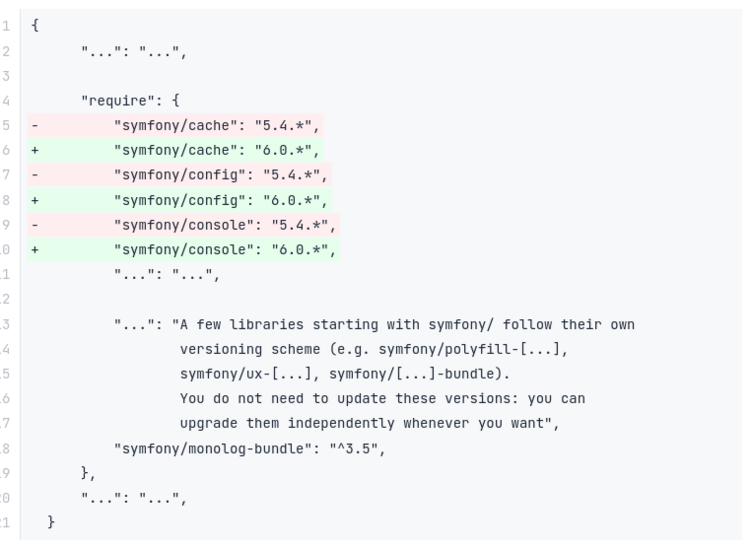
At the bottom of composer.json, in the extra block, you'll find a data entry for the Symfony version — don't forget to update that too. For example, set it to 6.0.* if you're moving to Symfony 6.0:
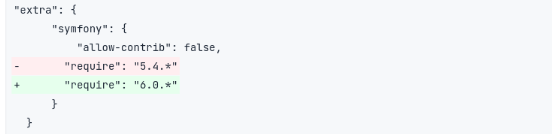
Then run this to pull down the new library versions:
composer update "symfony/*"
Dealing With Dependency Errors
If Composer throws a dependency error, it usually means some other libraries that depend on Symfony also need updating. You can force that with the --with-all-dependencies flag:
composer update "symfony/*" --with-all-dependencies
Still stuck? Your composer.json might be pinning a library version that simply isn't compatible with the new Symfony release. Bumping that library's version in composer.json usually clears things up.
Good to know: running the command will point you straight to the source of the conflict — the console output tells you exactly which library is causing trouble and which version you need to fix it.
2. Updating the Rest of Your Packages
Once Symfony itself is sorted, it's worth updating everything else too. That's safe to do with a simple:
composer update
Every version bump matters for keeping a Symfony project healthy. Migrations clear out deprecated code and bring in new capabilities, which keeps the project sustainable long-term. Skip them for too long, and you start missing out on features and performance gains your project could really use.
Expectations vs. Reality
At this point you might be thinking: "Just tweak composer.json, run the command, and it's smooth sailing from there."
In reality, a migration can take anywhere from a couple of hours to several weeks — it really depends on the state of the application. It's rarely trivial.
As an example: on a codebase that was reasonably clean but had almost no test coverage, it still took us about two weeks to get to Symfony 6.3 and PHP 8.1.
That's exactly why regular refactoring and solid test coverage pay off over time — gradual, frequent migrations end up cheaper than letting things pile up.
Symfony Update: Benefits and Risks to Consider
Keepinecrig Symfony up to date helps maintain your application's security, compatibility, and scalability. Here are the key differences between a successful migration and continuing to use an outdated version.
| Criteria | ✅ After a Successful Symfony Update | ❌ Without a Symfony Update |
|---|---|---|
| Security | Access to security patches on a supported version | Potential unpatched security vulnerabilities |
| Compatibility | Better compatibility with supported technologies | Risk of incompatibility with newer PHP versions and dependencies |
| Performance | Opportunity to benefit from recent optimizations | Limited access to improvements introduced in newer versions |
| Maintenance | Easier code and dependency maintenance | More complex and costly maintenance |
| Features | Access to features available in the target version | Newer features remain unavailable |
| Scalability | Easier future enhancements and integrations | Growing technical debt and more complex future migrations |
At MONARK IT, we help businesses improve their visibility on Google, from technical SEO audits and content optimization to performance monitoring. Explore our SEO agency services in Marrakech to identify the right strategies for your website and business goals.
A well-planned Symfony update helps reduce the risks of outdated software and makes your application easier to maintain and evolve. However, thorough testing is essential to ensure stability and prevent regressions.
After the Composer Update, What's Next?
- Read the changelog. Once the migration runs successfully, go through the new version's documentation. This is how you catch removed features or libraries and find their replacements — especially important on a major version bump.
- Test, thoroughly. The migration itself might be done, but don't skip this step. Run your unit, functional, and integration tests to make sure everything still works the way it should and catch anything that broke along the way.
- Watch performance in production. This one's on the ops side — keeping an eye on how the app behaves once it's live, since updates can shift performance in either direction.
No two applications are alike, and a major Symfony version bump is rarely completely painless.
That said, in our experience most Symfony features stay the same from version to version, which keeps the amount of code you actually need to touch fairly limited. And for the parts that do change, Symfony's deprecation logs make life a lot easier — they flag what's going away well before it actually does, so upgrades rarely come as a surprise.
The one real bottleneck is waiting on third-party bundles to catch up and release versions compatible with the new Symfony release. If you're in a hurry, you can always speed things along by submitting a pull request yourself — plenty of bundle maintainers would welcome the help. And now that you've got a clearer picture of what a Symfony migration actually involves, hopefully the next one feels a lot less daunting.
Happy coding!
A successful upgrade belongs to a broader view of the application: code quality, testing, security, deployment, and business needs. If you are preparing a migration, technical takeover, or new features, our Symfony development in Marrakech expertise can begin with a focused audit and a realistic evolution plan.
By Zahira SAADI